How to display file extension in Windows 7 in explorer

Windows 7 by default does not display file extension while listing files in explore window. You can change this behavior easily. Open any explorer window. From menu click "Tools" menu. Under "Tools" menu select "Folder Options..."  as shown below.


On folder options dialog select "View" tab. On "View" tab uncheck the check box with text "Hide extensions for known file types."


Now check your explorer window.. it should be displaying extensions for all the files listed. 
   

How to display full folder path in taskbar for opened folders in Windows 7

Windows 7 by default  display's only folder name on the taskbar. If you have too many folders open, then it becomes difficult to recognize the folder is from which drive. 


You can change this to display full folder path on taskbar easily. 
On any explorer window oepn Tools menu, and select Folder Options as shown below.


On the Folder Options dialog box select Views tab. Now Select the check box in front of text "Display the full path in the title bar (Classic theme only) " option as shown below.


   Now look at the task bar. It will be displaying full path for every folder opened. These steps are also applicable for Windows 2008 R2. 

How to create shutdown shortcut for Windows

Sometimes its better to have shutdown shortcut handy, if you want to shutdown your computer number of times.
Its easy to create the shutdown shortcut on desktop. You just have to create new file in notepad. Type in the following command in file:


   shutdown -s -t 00


save the file on desktop with name ShutdownShortcut. If you see the file on desktop it will have extension ".txt", change it to ".bat". 


Now your shortcut for shutdown is ready. Just double click the bat file and your computer will start shutdown immediately. 


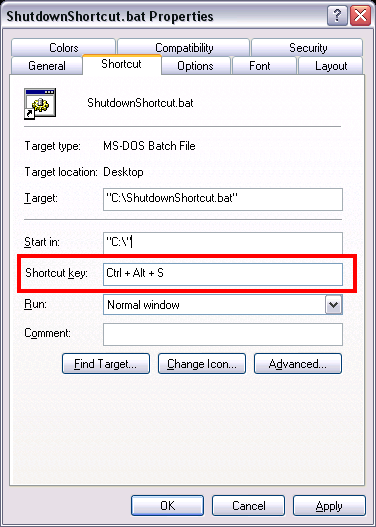
If you don't like to click the mouse for shutdown you can have a keyboard shortcut for this command as well. 


Just create a shortcut for the "ShutdownShortcut.bat" on desktop. Right click the shortcut created and select properties.  
As shown in below image click on Shortcut key, then press any key you would like to have shortcut key for Shutdown. Click Apply and Ok. 


Now whenever you will press the "Ctrl +Alt + Selected Key" your computer will start shutdown.

Caching is a technique used to store frequently accessed data in a temporary storage layer to improve system performance and reduce latency....